PCF8574 I2C I/O Expansion Module (Red) – 8-Bit GPIO Extender for Arduino, Raspberry Pi

SKU: FA2189-1
Expander Chip

PCF8574T

Interface

I2C (SDA, SCL)

I/O Pins

8 quasi-bidirectional

Voltage Range

2.5V – 6V

I2C Speed

100 kHz (standard), 400 kHz (fast)

Address Range

0x20 – 0x27 (configurable via A0–A2)

Pull-up Resistors

Onboard

Module Dimensions

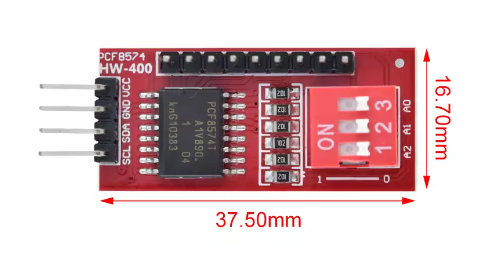
Approx. 20 × 15 mm

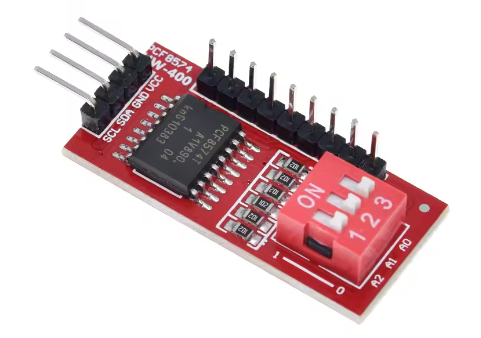
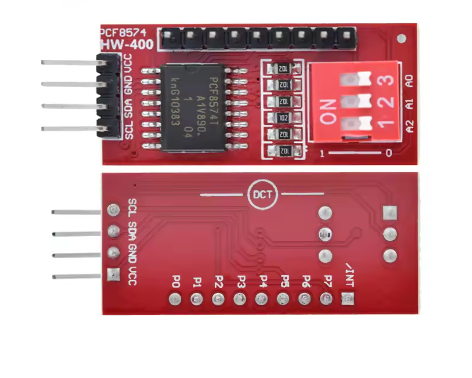
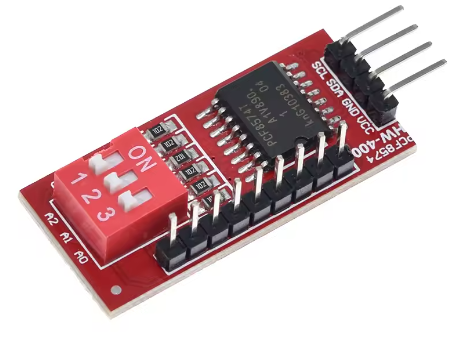
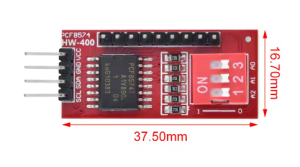
The PCF8574 I2C I/O Expansion Module (Red) is a compact, reliable GPIO extender that adds 8 additional input/output pins to your microcontroller using only two I2C communication lines. Built around the PCF8574T chip from Texas Instruments, this module solves one of the most common challenges in embedded projects — running out of available GPIO pins — by providing a simple, low-cost expansion solution. The distinctive red PCB makes it easy to identify in your project.

At the heart of the module is the PCF8574T, an 8-bit I/O expander with an I2C interface. It provides 8 quasi-bidirectional I/O pins that can be independently configured as inputs or outputs. The chip communicates with the host microcontroller through the standard I2C bus (SDA and SCL), requiring only two pins for full control of all 8 expansion pins. This makes it ideal for projects where GPIO pins are scarce.

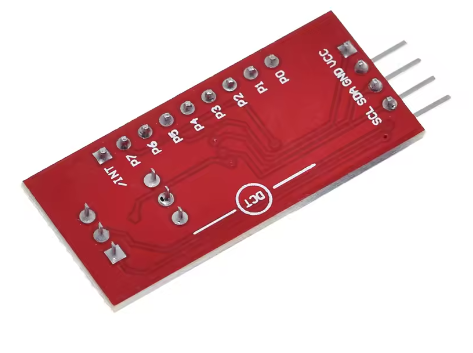
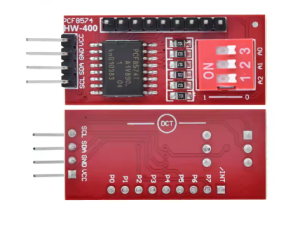
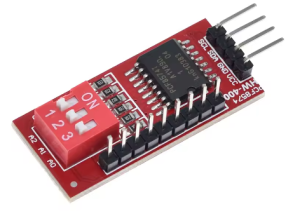
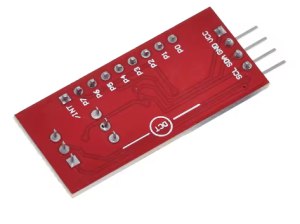
The module features onboard I2C pull-up resistors for reliable communication, and pin headers for easy connection to external devices via jumper wires or a breadboard. The compact PCB design with mounting holes makes it suitable for embedding into enclosures and custom projects. The 8 I/O pins are broken out with clear silkscreen labeling.

Address selection is handled through 3 onboard solder jumpers (A0, A1, A2) , allowing you to set the I2C address. This means you can connect up to 8 PCF8574 modules on the same I2C bus — providing a total of 64 additional I/O pins without conflicts. This scalability makes the module suitable for complex projects requiring many inputs or outputs.

The module operates from 2.5V to 6V, making it compatible with both 3.3V and 5V microcontrollers including Arduino, ESP32, ESP8266, STM32, and Raspberry Pi. The I2C bus supports standard mode (100 kHz) and fast mode (400 kHz) for responsive communication.

The PCF8574 is widely used in LCD displays (I2C backpacks), keypad matrix expansion, relay boards, LED indicators, sensor arrays, and industrial control panels. The module is supported by the Arduino Wire library and PCF8574 libraries (such as the one by Renzo Mischianti or Rob Tillaart), which provide simple functions for reading and writing pins. On Raspberry Pi, the smbus or Adafruit PCF8574 libraries can be used.

Whether you are building a home automation system, a multi-sensor monitoring station, or a control panel with many buttons and LEDs, the PCF8574 I2C I/O Expansion Module provides a reliable, cost-effective way to add more I/O to your project. It is suitable for individual makers, students, and businesses purchasing in bulk for product development or educational programs.


Features

  • 8 additional GPIO pins — Expands your microcontroller’s I/O using only two I2C lines

  • PCF8574T chip — Reliable, widely supported 8-bit I/O expander

  • Red PCB — Distinctive color for easy identification

  • I2C interface — Standard mode (100 kHz) and fast mode (400 kHz) support

  • Onboard pull-up resistors — For reliable I2C communication

  • Address selection jumpers — A0, A1, A2 allow up to 8 modules on the same bus

  • Wide voltage range — 2.5V to 6V, compatible with 3.3V and 5V systems

  • Compact form factor — Small PCB with mounting holes for easy integration

  • Clear labeling — Silkscreen markings for easy pin identification

  • Wide library support — Compatible with Arduino, Raspberry Pi, and other platforms


Technical Specifications 

# Parameter Specification
1 Expander Chip PCF8574T
2 Interface I2C (SDA, SCL)
3 I/O Pins 8 quasi-bidirectional
4 Voltage Range 2.5V – 6V
5 I2C Speed 100 kHz (standard), 400 kHz (fast)
6 Address Range 0x20 – 0x27 (configurable via A0–A2)
7 Pull-up Resistors Onboard
8 Module Dimensions Approx. 20 × 15 mm

Usage

Getting Started

  1. Connect power — Supply 3.3V or 5V to the VCC pin and GND to ground.

  2. Connect I2C lines — Connect SDA and SCL to your microcontroller‘s I2C bus.

    • Arduino Uno: SDA → A4, SCL → A5

    • ESP32: SDA → GPIO21, SCL → GPIO22 (default)

    • ESP8266: SDA → D2, SCL → D1

    • Raspberry Pi: SDA → GPIO2, SCL → GPIO3

  3. Set the I2C address — Solder the A0, A1, A2 jumpers to set the module’s I2C address. The default address is typically 0x20 (all jumpers open).

  4. Install the library — For Arduino, install the PCF8574 library by Renzo Mischianti or Rob Tillaart. For Raspberry Pi, use the Adafruit PCF8574 library or smbus.

  5. Write your code — Use the library functions to set pin modes and read/write pin states.

Address Configuration

A0 A1 A2 I2C Address
Open Open Open 0x20
Closed Open Open 0x21
Open Closed Open 0x22
Closed Closed Open 0x23
Open Open Closed 0x24
Closed Open Closed 0x25
Open Closed Closed 0x26
Closed Closed Closed 0x27

Example Arduino Code

cpp
#include <Wire.h>
#include <PCF8574.h>

PCF8574 pcf8574(0x20);  // Default address 0x20

void setup() {
  Serial.begin(9600);
  pcf8574.begin();
  pcf8574.pinMode(P0, OUTPUT);  // Set P0 as output
  pcf8574.pinMode(P1, INPUT);   // Set P1 as input
}

void loop() {
  pcf8574.digitalWrite(P0, HIGH);  // Turn on P0
  delay(500);
  pcf8574.digitalWrite(P0, LOW);   // Turn off P0
  delay(500);
  Serial.println(pcf8574.digitalRead(P1));  // Read P1 state
}

Typical Applications

  • LCD display backpacks — Control 16×2 LCDs with only two I2C pins

  • Keypad matrix expansion — Scan multiple buttons with fewer MCU pins

  • Relay boards — Control multiple relays through I2C

  • LED indicators — Drive multiple status LEDs

  • Sensor arrays — Read multiple digital sensors

  • Raspberry Pi GPIO expansion — Add more GPIO pins to Pi projects

Notes for Business Buyers

  • Scalable — Up to 8 modules on one I2C bus provide 64 additional I/O pins.

  • Wide compatibility — Works with 3.3V and 5V systems, Arduino and Raspberry Pi.

  • Proven technology — PCF8574 is a widely adopted I/O expander with extensive documentation.

  • Suitable for bulk purchasing — Ideal for product development, educational kits, and commercial deployments.

Q: What is the PCF8574 I2C I/O Expansion Module used for?

It adds 8 additional GPIO pins to your microcontroller using only two I2C communication lines, solving pin shortage problems in embedded projects.

Q: How many modules can I connect to the same I2C bus?

Up to 8 modules can be connected on the same I2C bus using different addresses, providing a total of 64 additional I/O pins.

Q: How do I set the I2C address?

Use the A0, A1, A2 solder jumpers on the module. Solder or leave open the jumpers to select one of 8 possible addresses (0x20–0x27).

Q: What is the default I2C address?

The default address is typically 0x20 when all address jumpers are left open.

Q: What voltage does the module require?

It operates from 2.5V to 6V, making it compatible with both 3.3V and 5V systems.

Q: Can I use this module with a Raspberry Pi?

Yes. Connect SDA to GPIO2 and SCL to GPIO3, and use the Adafruit PCF8574 library or smbus.

Q: What library should I use with Arduino?

Use the PCF8574 library by Renzo Mischianti or Rob Tillaart, available through the Arduino Library Manager.

Q: Are the I/O pins bidirectional?

Yes. Each of the 8 pins can be independently configured as an input or output using the library.

Q: Does the module have pull-up resistors?

Yes. The module includes onboard I2C pull-up resistors for reliable communication.

Q: Can I purchase in bulk for a school or company?

Yes. This module is suitable for both individual users and business purchasing, including product development, educational kits, and commercial deployments.