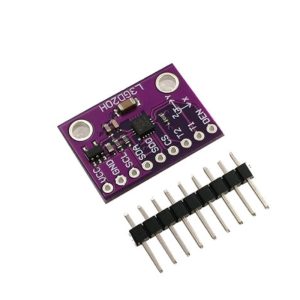
Product Overview
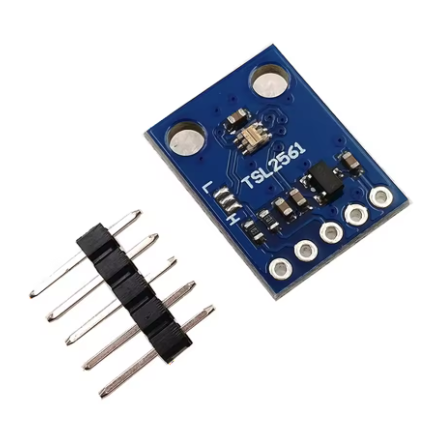
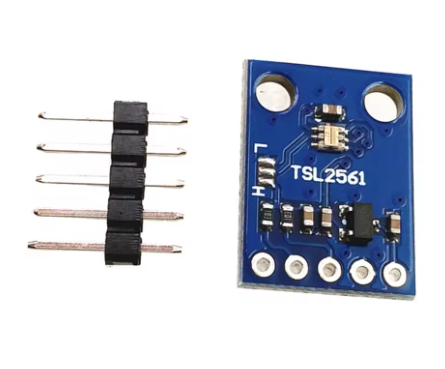
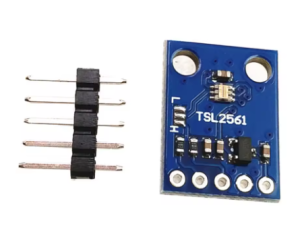
The GY-2561 TSL2561 Luminosity Sensor Module is a sophisticated digital light sensor designed to accurately measure ambient light intensity in a way that closely mimics the human eye’s response. Unlike conventional light sensors that respond strongly to infrared light (which humans cannot see), the TSL2561 uses a dual-diode architecture to provide more accurate lux measurements across a wide range of lighting conditions .
At the heart of this module is the TSL2561 chip from TAOS (now part of ams OSRAM), which integrates two photodiodes: one sensitive to both visible and infrared light (Channel 0), and another sensitive primarily to infrared light (Channel 1). By comparing the outputs of these two channels, the sensor effectively subtracts the infrared component, delivering readings that correlate closely with how bright a light source appears to the human eye .
The sensor can measure illuminance from as low as 0.1 Lux (deep twilight) up to over 40,000 Lux (direct sunlight), making it suitable for applications ranging from display backlight control in smartphones and tablets to greenhouse lighting management and automatic streetlight control . The module communicates via the I2C interface (SDA/SCL), requiring only two wires to connect to your microcontroller (Arduino, ESP32, Raspberry Pi, STM32, etc.) .
A key advantage of the TSL2561 is its programmable integration time and gain settings. For very dim environments, you can increase the integration time to collect more light, effectively boosting sensitivity. For bright outdoor conditions, you can lower the integration time to prevent ADC saturation, ensuring accurate readings across a 0.1 – 40,000+ Lux dynamic range .
The GY-2561 module includes all necessary support components, such as pull-up resistors for the I2C lines and voltage regulation, simplifying integration into your projects .
Key Features
-
Human Eye Response Matching: Uses dual photodiodes (broadband and infrared) with built-in compensation to provide lux measurements that accurately represent brightness as perceived by the human eye, minimizing errors caused by infrared-rich light sources like incandescent bulbs .
-
0.1 – 40,000+ Lux Dynamic Range: Capable of measuring light from starlit conditions (0.1 Lux) to direct overhead sunlight (40,000+ Lux), making it suitable for diverse indoor and outdoor applications .
-
I2C Digital Interface: Communicates via the standard I2C protocol (up to 400 kHz Fast-Mode), using only two pins (SDA, SCL) to connect to your microcontroller, saving valuable I/O resources for other peripherals .
-
Configurable Gain and Integration Time: Offers programmable gain (1x or 16x) and 13 selectable integration times (from 13 ms to 402 ms), allowing you to trade off between resolution, measurement range, and sample rate depending on ambient lighting conditions .
-
16-Bit Digital Output: Each photodiode channel provides a high-resolution 16-bit digital output, enabling precise light level analysis and sensitive measurements even in low-light conditions .
-
Selectable I2C Addresses: Supports three different I2C addresses (0x29, 0x39, 0x49) by setting the state of the ADDR pin (GND, Float, or VCC), allowing multiple TSL2561 sensors on the same I2C bus without address conflicts .
-
Ultra-Low Power Consumption: Typical active current is approximately 0.5 mA – 0.6 mA, with a power-down mode drawing less than 15 µA, making it excellent for battery-powered and energy-conscious projects .
-
Integrated 16-Bit Integrating ADCs: Features dual analog-to-digital converters that directly convert photodiode currents to a digital output, simplifying the interface design .
Technical Specifications
Pinout & Connection Guide
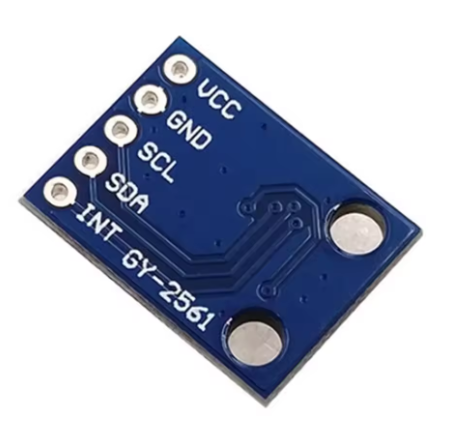
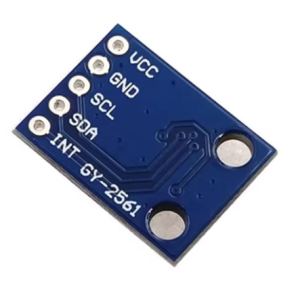
The GY-2561 module typically features a 5-pin or 4-pin configuration. Pin labeling may vary slightly between manufacturers; always verify the silkscreen on your specific board .
Pin Definitions
Note: Some GY-2561 modules omit the INT pin breakout and use a 4-pin configuration. The ADDR pin is often tied to a specific state on the PCB and may not be accessible. If you need to change the I2C address, check if your module has ADDR pads or solder jumpers.
I2C Address Selection (TSL2561)
The I2C address is determined by the state of the ADDR pin :
If your GY-2561 module has ADDR pads, you can solder them to select the desired address. Most modules come with the ADDR pin configured to Float (0x39) by default.
I2C Pin Mapping for Common Development Boards
Wiring Diagram (Arduino Uno)
GY-2561 Module          →    Arduino Uno
─────────────────────────────────────────
VCC (5V pin)            →    5V
GND                     →    GND
SCL                     →    A5 (SCL)
SDA                     →    A4 (SDA)
Wiring Diagram (ESP32 – 3.3V)
GY-2561 Module          →    ESP32
─────────────────────────────────────────
VCC                     →    3.3V
GND                     →    GND
SCL                     →    GPIO22 (SCL)
SDA                     →    GPIO21 (SDA)
Note: The GY-2561 module includes an onboard voltage regulator, allowing it to accept either 3.3V or 5V power. This makes it compatible with both 5V (Arduino) and 3.3V (ESP32, Raspberry Pi) systems .
Usage Guide
Software Setup (Arduino IDE)
Step 1: Install Required Libraries
The “Adafruit TSL2561” library is the most common and well-supported library for this sensor.
-
Open Arduino IDE → Sketch → Include Library → Manage Libraries
-
Search for “Adafruit TSL2561” by Adafruit
-
Click Install
-
(The library will automatically install the Adafruit Sensor and Adafruit BusIO dependencies)
Step 2: Basic Test Sketch
This sketch initializes the sensor, configures gain and integration time, and prints lux readings to the Serial Monitor.
#include <Wire.h>
#include <Adafruit_Sensor.h>
#include <Adafruit_TSL2561_U.h>
Adafruit_TSL2561_Unified tsl = Adafruit_TSL2561_Unified(TSL2561_ADDR_FLOAT, 12345);
void setup() {
Serial.begin(9600);
if(!tsl.begin()) {
Serial.println("No TSL2561 sensor found");
while(1);
}
Serial.println("TSL2561 Sensor Ready");
tsl.setGain(TSL2561_GAIN_1X);
tsl.setIntegrationTime(TSL2561_INTEGRATIONTIME_13MS);
sensor_t sensor;
tsl.getSensor(&sensor);
Serial.println("Sensor: " + String(sensor.name));
}
void loop() {
sensors_event_t event;
tsl.getEvent(&event);
if(event.light) {
Serial.print("Light: ");
Serial.print(event.light);
Serial.println(" lux");
} else {
Serial.println("Sensor overload");
}
delay(1000);
}
Step 3: Advanced Configuration (Gain and Integration Time)
The TSL2561 allows you to adjust gain (1x or 16x) and integration time to optimize for different lighting conditions :
Code example for low-light configuration:
tsl.setGain(TSL2561_GAIN_16X);
tsl.setIntegrationTime(TSL2561_INTEGRATIONTIME_402MS);
Code example for bright outdoor configuration:
tsl.setGain(TSL2561_GAIN_1X);
tsl.setIntegrationTime(TSL2561_INTEGRATIONTIME_13MS);
Raspberry Pi Setup (Python)
-
Enable I2C: sudo raspi-config → Interface Options → I2C → Yes → Reboot
-
Install required libraries:
sudo apt-get install python3-smbus
pip3 install adafruit-circuitpython-tsl2561
-
Python example code:
import board
import busio
import adafruit_tsl2561
i2c = busio.I2C(board.SCL, board.SDA)
sensor = adafruit_tsl2561.TSL2561(i2c)
sensor.gain = 1
sensor.integration_time = 13
print(f"Lux: {sensor.lux}")
Setting the I2C Address on the GY-2561 Module
If your GY-2561 module has accessible ADDR pads, you can select the I2C address as follows :
In the Adafruit library, you can specify the address when creating the sensor object:
Adafruit_TSL2561_Unified tsl = Adafruit_TSL2561_Unified(TSL2561_ADDR_LOW, 12345);
Adafruit_TSL2561_Unified tsl = Adafruit_TSL2561_Unified(TSL2561_ADDR_FLOAT, 12345);
Adafruit_TSL2561_Unified tsl = Adafruit_TSL2561_Unified(TSL2561_ADDR_HIGH, 12345);
Q: Why is this sensor better than a simple photoresistor (LDR)?
A photoresistor changes resistance based on light, but its spectral response is not calibrated to the human eye, and it requires an analog-to-digital converter. The TSL2561 provides a calibrated digital lux output (lx), has infrared compensation for accurate readings under different light sources (incandescent, fluorescent, sunlight), and features programmable gain and integration time for a wide measurement range .
Q: How does the TSL2561 distinguish between visible and infrared light?
The TSL2561 contains two photodiodes :
-
Channel 0: Measures both visible and infrared (full spectrum)
-
Channel 1: Measures primarily infrared light
-
By comparing the two channels, the sensor calculates the visible light component (lux) using manufacturer-defined formulas, effectively removing the infrared contribution that would otherwise skew readings .
Q: What is the voltage tolerance for the GY-2561 module?
The GY-2561 module includes an onboard voltage regulator, allowing it to accept 3.3V – 5V input on the VCC pin . This makes it compatible with both 5V (Arduino) and 3.3V (ESP32, Raspberry Pi) systems .
Q: What is the purpose of the INT (interrupt) pin?
The INT pin is an optional output that can be programmed to trigger (go LOW) when the light level crosses user-defined upper or lower thresholds. This allows your microcontroller to respond only when light levels change significantly, reducing the need for continuous polling .
Q: How do I change the I2C address of the TSL2561?
On the GY-2561 module, the I2C address is selected by the state of the ADDR pin :
If your module has ADDR pads or a solder jumper, you can modify it. If the ADDR pin is not broken out, the address is fixed (usually 0x39) .
Q: Why are my lux readings different from a commercial light meter?
Variations can be caused by:
-
Different integration time/gain settings: Ensure both sensors use comparable settings (integration time and gain) .
-
Position relative to light source: The sensor’s angle of incidence matters. Ensure both sensors are facing the light source identically.
-
Calibration differences: The TSL2561’s lux calculation formula is designed to approximate the human eye under typical lighting conditions. It may not perfectly match every commercial meter.
Q: The sensor returns 0 lux in moderately lit conditions. What's wrong?
This often indicates the channel is saturated (overloaded) or under-range. Try adjusting settings :
Q: Can I use multiple TSL2561 sensors on the same I2C bus?
Yes. Since the TSL2561 supports three different I2C addresses (0x29, 0x39, 0x49), you can connect up to three sensors on the same bus by setting the ADDR pin of each to a different state (GND, Float, VCC) .
Q: Does this sensor measure UV (ultraviolet) light?
The TSL2561 is designed for visible and infrared light measurement. It is not intended for UV light detection. Its spectral range typically covers 380 nm to 1100 nm, which includes the tail end of UVA but has low sensitivity.
Q: How do I calculate illuminance (lux) manually from the raw ADC values (CH0 and CH1)?
The TSL2561 datasheet provides a specific empirical formula to convert raw CH0 and CH1 counts to lux . The Adafruit library handles this conversion automatically. If you need to implement it manually, refer to the datasheet formulas, which vary based on the CH1/CH0 ratio .