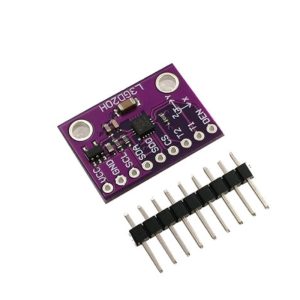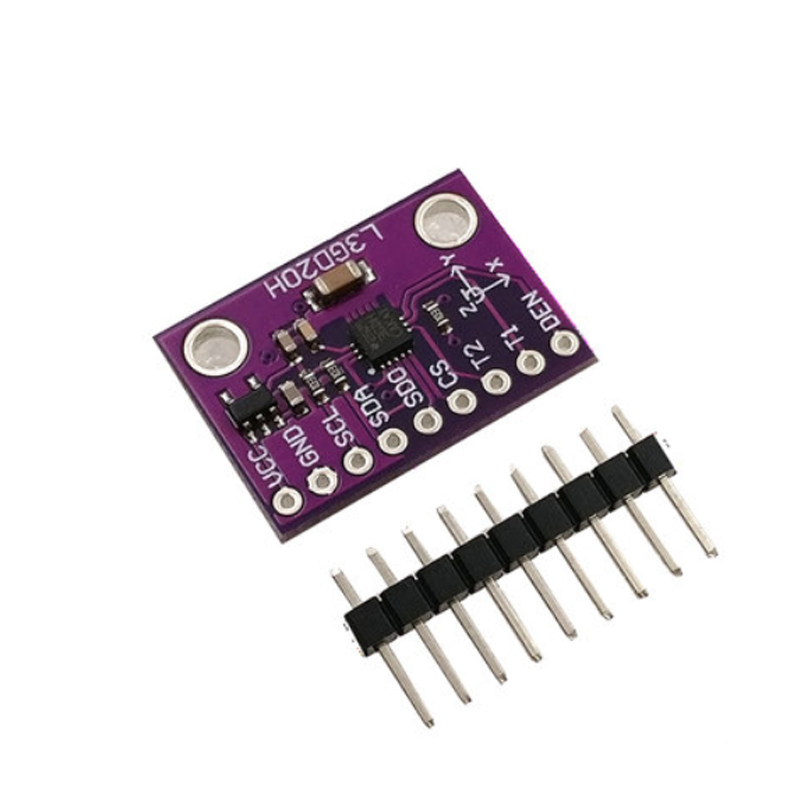
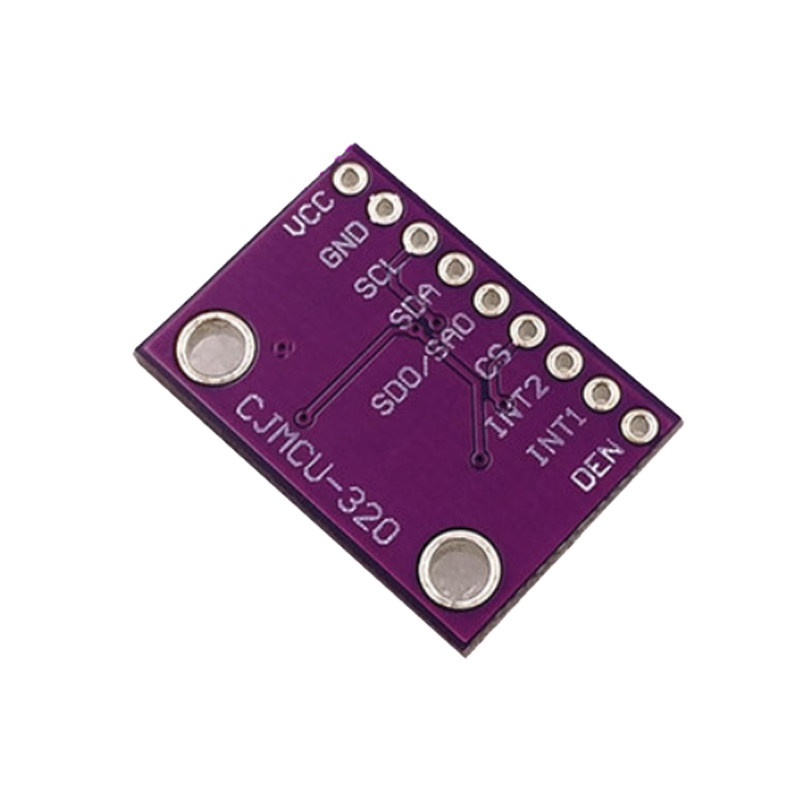
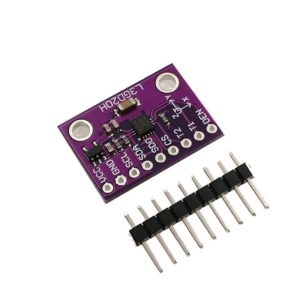
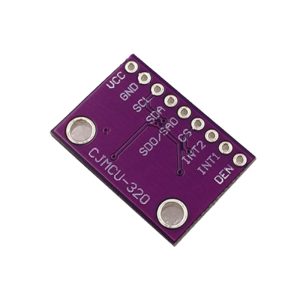
CJMCU-320 L3GD20H three-axis high-precision gyroscope sensor module

Sensor Chip

STMicroelectronics L3GD20H

Package

LGA-16 (3mm × 3mm × 1mm)

Supply Voltage (VCC)

3.3V – 5V DC (breakout board with regulator)

Core Supply Voltage (VDD)

2.2V – 3.6V DC

I/O Voltage (VDD_IO)

1.8V – 3.6V (5V tolerant on breakout)

Operating Current

5 mA (typical, active)

Sleep Mode Current

2.5 mA

Power-Down Current

1 µA

Full-Scale Ranges (Selectable)

±245 dps, ±500 dps, ±2000 dps

Sensitivity (±245 dps)

8.75 mdps/digit

Sensitivity (±500 dps)

17.50 mdps/digit

Sensitivity (±2000 dps)

70.00 mdps/digit

Product Overview

The CJMCU-320 L3GD20H Gyroscope Module is a compact, high-performance breakout board based on STMicroelectronics’ advanced L3GD20H MEMS motion sensor. This three-axis digital gyroscope is designed to measure angular velocity (rate of rotation) around the X (pitch), Y (roll), and Z (yaw) axes with exceptional precision and stability .

Built on a tiny 3x3mm LGA-16 package, the L3GD20H integrates a sensing element manufactured using ST’s dedicated micromachining process with a CMOS IC interface that provides signal conditioning and digital output . The result is a highly reliable, low-power sensor with user-selectable measurement scales of ±245, ±500, or ±2000 degrees per second (dps), making it suitable for everything from gentle human motion detection to high-speed drone flight control .

The CJMCU-320 breakout board includes all necessary support components, often featuring an onboard 3.3V voltage regulator and level shifters, allowing it to accept a 5V power supply while providing 3.3V to the sensor chip. This makes the module directly compatible with both 3.3V systems (ESP32, Raspberry Pi, STM32) and 5V systems (Arduino Uno, Mega) without the need for external level converters .


Key Features

  • Three-Axis Angular Rate Sensing: Simultaneously measures rotation around X (pitch), Y (roll), and Z (yaw) axes with 16‑bit resolution .

  • Selectable Full-Scale Ranges: User-selectable measurement ranges of ±245 dps, ±500 dps, or ±2000 dps, allowing optimization for either high-sensitivity or high-speed applications .

  • High Precision & Low Noise: Angular rate noise density of only 0.011°/s/√Hz and nonlinearity of 0.2% FS ensures clean, stable output .

  • Dual Communication Interfaces: Supports both I2C (up to 400 kHz) and SPI (up to 10 MHz) protocols for flexible microcontroller integration .

  • Integrated 32-Level FIFO Buffer: On-chip FIFO allows data storage, reducing host processor intervention and enabling low-power system designs .

  • Low Power Consumption: Typical operating current of just 5mA, with sleep mode (2.5mA) and power-down mode (1µA) options for battery‑powered applications .

  • Programmable Interrupts: Two dedicated interrupt lines (INT1, DRDY/INT2) can be configured for data ready, FIFO threshold, or custom wake‑up events .

  • Wide Operating Temperature: Industrial‑grade range of -40°C to +85°C ensures reliable performance in demanding environments .

  • Built-in Temperature Sensor: Embedded temperature sensor aids in drift compensation and system monitoring .

  • Software-Adjustable Filters: User‑enabled integrated high‑pass and low‑pass filters for noise reduction and bandwidth control .

  • High Shock Survivability: Rated to withstand up to 10,000g mechanical shock .


Technical Specifications

Parameter Operating Value
Sensor Chip STMicroelectronics L3GD20H 
Package LGA-16 (3mm × 3mm × 1mm) 
Supply Voltage (VCC) 3.3V – 5V DC (breakout board with regulator)
Core Supply Voltage (VDD) 2.2V – 3.6V DC 
I/O Voltage (VDD_IO) 1.8V – 3.6V (5V tolerant on breakout) 
Operating Current 5 mA (typical, active) 
Sleep Mode Current 2.5 mA
Power-Down Current 1 µA 
Full-Scale Ranges (Selectable) ±245 dps, ±500 dps, ±2000 dps 
Sensitivity (±245 dps) 8.75 mdps/digit 
Sensitivity (±500 dps) 17.50 mdps/digit 
Sensitivity (±2000 dps) 70.00 mdps/digit 
Output Resolution 16-bit per axis 
Angular Rate Noise Density 0.011 °/s/√Hz 
Nonlinearity 0.2% FS 
Communication Protocols I2C (up to 400 kHz), SPI (up to 10 MHz) 
FIFO Buffer Size 32 levels, 16-bit data output 
Start-Up Time 50 ms (typical) 
Shock Survival 10,000 g 
ESD Tolerance 2 kV (HBM) 
Operating Temperature -40°C to +85°C 
Module Dimensions Approx. 15mm × 12mm (CJMCU-320 breakout)
Weight Approx. 2g – 3g

Pinout & Connection Guide

The CJMCU-320 breakout board typically features a 6-pin or 8-pin configuration. Pin labeling may vary slightly between manufacturers; always verify the silkscreen on your specific board.

Pin Definitions

Pin Label Function Description
VCC VCC / 3-5V Power Supply Connect to 3.3V or 5V DC power source
GND GND Ground Common ground connection
SCL SCL / SPC I2C Clock / SPI Clock Serial clock line for I2C or SPI communication 
SDA SDA / SDI I2C Data / SPI Data In I2C data line or SPI data input (MOSI) 
SDO SDO SPI Data Out SPI serial data output (MISO) 
CS CS Chip Select SPI enable; pull HIGH for I2C mode 
INT1 INT1 Interrupt 1 Programmable interrupt output 
DRDY DRDY/INT2 Data Ready Interrupt Indicates new data is available 

I2C Mode Wiring (Recommended – Uses 2 Pins)

For I2C communication (simplest wiring), connect the CS pin to VCC to disable SPI mode. No additional connection to SDO is needed.

CJMCU-320 Pin Arduino Uno ESP32 ESP8266 Raspberry Pi
VCC 5V 3.3V 3.3V 3.3V (Pin 1)
GND GND GND GND GND (Pin 6)
SCL A5 (SCL) GPIO22 GPIO5 (D1) GPIO3 (Pin 5)
SDA A4 (SDA) GPIO21 GPIO4 (D2) GPIO2 (Pin 3)
CS 5V 3.3V 3.3V 3.3V (Pin 1)
SDO Leave unconnected Leave unconnected Leave unconnected Leave unconnected

SPI Mode Wiring (Faster – 4 Pins)

For higher data rates, use SPI communication with the CS pin controlled by a GPIO.

CJMCU-320 Pin Arduino Uno ESP32
VCC 5V 3.3V
GND GND GND
SCL D13 (SCK) GPIO18
SDA D11 (MOSI) GPIO23
SDO D12 (MISO) GPIO19
CS D10 GPIO5

I2C Address Configuration

The L3GD20H has a configurable I2C address determined by the SDO/SA0 pin :

SDO/SA0 Pin I2C Address (7-bit) 8-bit Write Address
Connected to GND 0x6A 0xD4
Connected to VCC 0x6B 0xD6

On most CJMCU-320 boards, the SDO pin is broken out, allowing you to select the address by connecting it to GND or VCC. When using I2C mode, CS must be pulled HIGH (connected to VCC) to disable SPI mode .


Theory of Operation

How a MEMS Gyroscope Works

The L3GD20H uses a MEMS (Micro-Electro-Mechanical Systems) vibrating structure. When the sensor rotates, Coriolis forces cause a measurable displacement of the vibrating element, which is converted into an electrical signal. The IC interface processes this signal, applies filtering, and outputs a 16-bit digital value proportional to angular velocity .

Sensitivity & Scale Factors

The raw 16-bit output must be converted to degrees per second using the appropriate scale factor:

Full-Scale Range Sensitivity Scale Factor (LSB per °/s)
±245 dps 8.75 mdps/digit 114.285 LSB per °/s
±500 dps 17.50 mdps/digit 57.142 LSB per °/s
±2000 dps 70.00 mdps/digit 14.285 LSB per °/s

For example, with the ±2000 dps range selected, a raw output value of 1428 corresponds to approximately 100°/s (1428 ÷ 14.285 ≈ 100) .

Output Data Rate & Bandwidth

The L3GD20H offers user-selectable output data rates (ODR) and bandwidth settings. Lower ODR reduces power consumption; higher ODR captures faster motion.


Usage Guide

Software Setup (Arduino IDE)

Step 1: Install Required Libraries

The L3GD20H is supported by several libraries. The most popular is the Adafruit L3GD20 library, which works with both L3GD20 and L3GD20H variants .

  1. Open Arduino IDE → Sketch → Include Library → Manage Libraries

  2. Search for “Adafruit L3GD20”

  3. Install the library by Adafruit (it will also install dependencies)

Step 2: Basic Test Sketch (I2C Mode)

cpp
/*
  CJMCU-320 L3GD20H Gyroscope Basic Read Example
*/

#include <Wire.h>
#include <Adafruit_Sensor.h>
#include <Adafruit_L3GD20_U.h>

// Create gyroscope object (I2C address 0x6B default)
Adafruit_L3GD20_Unified gyro = Adafruit_L3GD20_Unified(20);

void setup() {
  Serial.begin(115200);
  
  // Initialize the sensor
  if (!gyro.begin()) {
    Serial.println("L3GD20H sensor not found! Check wiring.");
    while (1);
  }
  
  // Set measurement range (±245, ±500, or ±2000 dps)
  gyro.setRange(L3GD20_RANGE_2000_DPS);
  
  // Set data rate (100, 200, 400, or 800 Hz)
  gyro.setDataRate(L3GD20_DATARATE_400_HZ);
  
  Serial.println("CJMCU-320 L3GD20H Ready");
  Serial.println("-----------------------------");
}

void loop() {
  sensors_event_t event;
  gyro.getEvent(&event);
  
  // Gyroscope readings are in radians per second
  // Convert to degrees per second for easier interpretation
  float gx = event.gyro.x * (180.0 / PI);
  float gy = event.gyro.y * (180.0 / PI);
  float gz = event.gyro.z * (180.0 / PI);
  
  Serial.print("Gyro (°/s): ");
  Serial.print(gx); Serial.print(", ");
  Serial.print(gy); Serial.print(", ");
  Serial.println(gz);
  
  delay(100);
}

Step 3: Using Raw Values Directly (No Library)

cpp
/*
  L3GD20H Raw Register Read Example
*/

#include <Wire.h>

#define L3GD20H_ADDR 0x6B  // SDO = VCC, address 0x6B

void setup() {
  Serial.begin(115200);
  Wire.begin();
  
  // Initialize L3GD20H
  initL3GD20H();
  
  Serial.println("L3GD20H Raw Readings");
}

void loop() {
  // Read angular velocity (16-bit signed values)
  int16_t gx = readRegister16(0x28);  // X-axis angular rate
  int16_t gy = readRegister16(0x2A);  // Y-axis angular rate
  int16_t gz = readRegister16(0x2C);  // Z-axis angular rate
  
  // For ±2000 dps range, sensitivity is 70 mdps/digit = 0.07 dps/LSB
  float gx_dps = gx * 0.07;
  float gy_dps = gy * 0.07;
  float gz_dps = gz * 0.07;
  
  Serial.print("X: "); Serial.print(gx_dps);
  Serial.print(" dps, Y: "); Serial.print(gy_dps);
  Serial.print(" dps, Z: "); Serial.println(gz_dps);
  
  delay(100);
}

void initL3GD20H() {
  // Wake up and configure the sensor
  Wire.beginTransmission(L3GD20H_ADDR);
  Wire.write(0x20);  // CTRL_REG1
  Wire.write(0x0F);  // Enable all axes, normal mode, ODR = 100 Hz
  Wire.endTransmission();
  
  Wire.beginTransmission(L3GD20H_ADDR);
  Wire.write(0x23);  // CTRL_REG4
  Wire.write(0x20);  // ±2000 dps range
  Wire.endTransmission();
}

int16_t readRegister16(uint8_t reg) {
  Wire.beginTransmission(L3GD20H_ADDR);
  Wire.write(reg);
  Wire.endTransmission();
  
  Wire.requestFrom(L3GD20H_ADDR, 2);
  int16_t value = Wire.read() | (Wire.read() << 8);
  return value;
}

Selecting the Full-Scale Range

Full-Scale Range Register Setting (CTRL_REG4) Best For
±245 dps 0x00 Low-speed human motion, precise orientation tracking 
±500 dps 0x10 General robotics, drone stabilization
±2000 dps 0x20 High-speed rotation, acrobatic drones 

Using the FIFO Buffer

The 32-level FIFO buffer allows the sensor to store up to 32 samples before the host processor needs to read them. This is essential for low-power systems where the microcontroller sleeps between readings .

cpp
// Configure FIFO mode (example: stream mode, watermark at 16 samples)
Wire.beginTransmission(L3GD20H_ADDR);
Wire.write(0x2E);  // FIFO_CTRL_REG
Wire.write(0x40 | 0x10);  // Stream mode, watermark = 16
Wire.endTransmission();

Reading Angular Velocity

The raw data registers for angular velocity are 16-bit two’s complement values:

Register Axis
0x28 / 0x29 X-axis angular rate
0x2A / 0x2B Y-axis angular rate
0x2C / 0x2D Z-axis angular rate

Integrating Angular Velocity to Calculate Angle

The L3GD20H measures angular velocity (rate of rotation). To calculate the actual angle rotated, you must integrate the gyroscope output over time:

text
angle = angle + (gyro_rate × dt)

Where dt is the time interval between samples in seconds .

Example Angle Tracking Code

cpp
unsigned long lastTime = micros();
float angleX = 0, angleY = 0, angleZ = 0;

void updateAngles(float rateX, float rateY, float rateZ) {
  unsigned long now = micros();
  float dt = (now - lastTime) / 1000000.0;
  lastTime = now;
  
  angleX += rateX * dt;
  angleY += rateY * dt;
  angleZ += rateZ * dt;
}

Important Note: Gyroscopes experience drift over time due to integration of bias errors. For absolute orientation, combine gyroscope data with accelerometer and/or magnetometer data using a sensor fusion algorithm (e.g., complementary filter, Madgwick filter).

Q: What is the difference between L3GD20H and L3GD20?

The L3GD20H is an improved version of the L3GD20, featuring lower power consumption (5mA vs higher), better noise performance (0.011°/s/√Hz), and a smaller LGA package . The L3GD20H is the recommended choice for new designs.

Q: What are the I2C addresses of the L3GD20H?

The I2C address is determined by the SDO/SA0 pin :

  • SDO connected to GND: Address 0x6A (8‑bit: 0xD4)

  • SDO connected to VCC: Address 0x6B (8‑bit: 0xD6)

Q: Can I use the CJMCU-320 with a 5V microcontroller like Arduino Uno?

Yes. The CJMCU-320 breakout board includes an onboard voltage regulator and level shifters, making it compatible with both 3.3V and 5V systems. Connect VCC to 5V and SDA/SCL directly to the I2C pins .

Q: Can I use this module with ESP32 or ESP8266?

Yes. Connect VCC to 3.3V (ESP32/ESP8266 is 3.3V logic) and SDA/SCL to the appropriate I2C pins. The Adafruit L3GD20 library works on these platforms .

Q: How do I select between I2C and SPI communication?

The mode is selected by the CS pin :

  • I2C mode: Tie CS HIGH (connect to VCC)

  • SPI mode: Drive CS LOW via a microcontroller GPIO pin

Q: What is the purpose of the FIFO buffer?

The 32-level FIFO buffer stores gyroscope samples, allowing the host processor to enter low‑power sleep mode and wake up periodically to read multiple samples at once. This significantly reduces power consumption in battery‑powered applications .

Q: Why are my angle readings drifting over time?

Gyroscopes measure rate of rotation, not absolute angle. To get angle, you integrate the rate over time, which accumulates small errors (bias drift) into progressively larger angle errors. For stable absolute orientation, combine gyroscope data with accelerometer and/or magnetometer data using a sensor fusion algorithm.